Back to BlogAgentic Coding
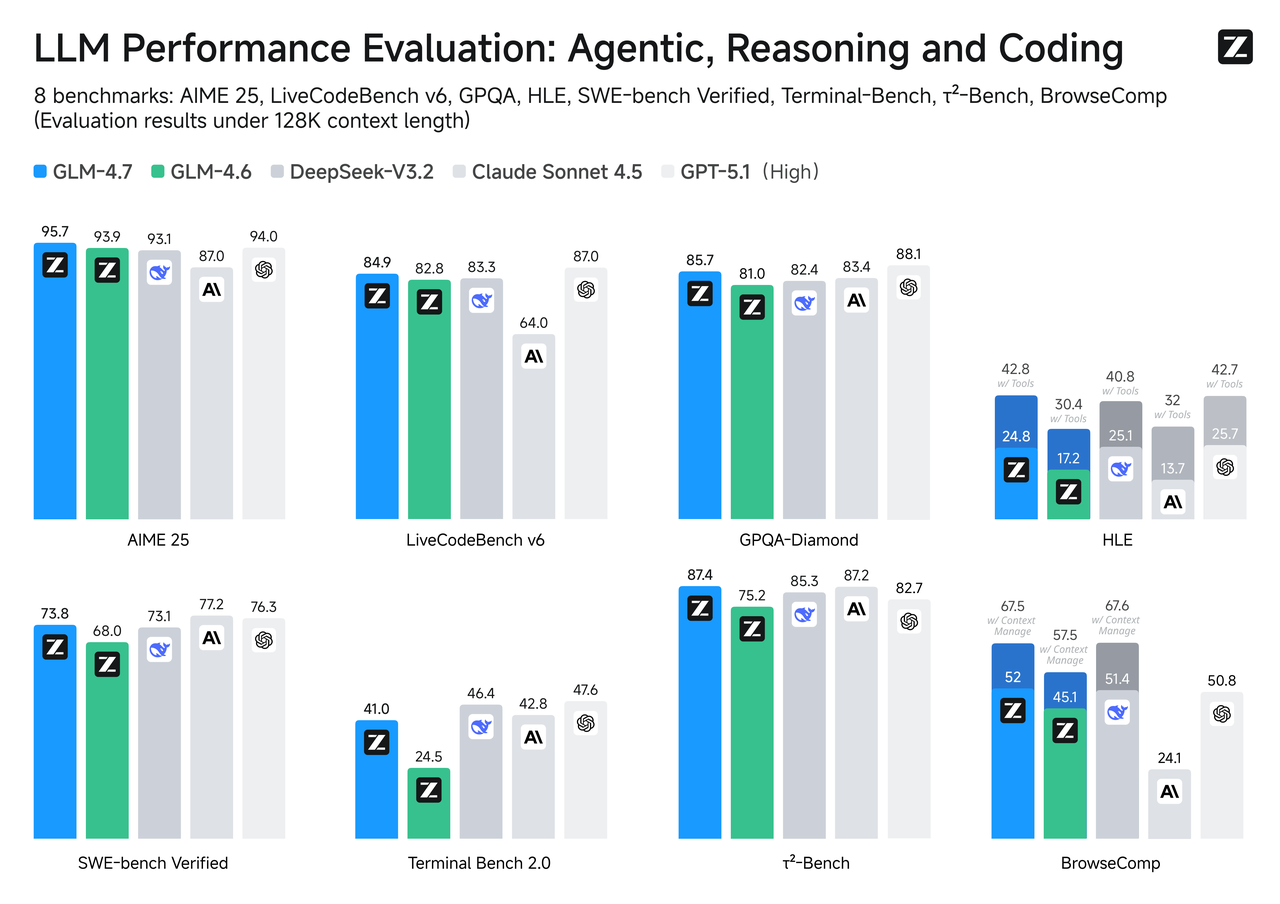 GLM-4.7 LLM Performance Evaluation - Benchmark Comparison
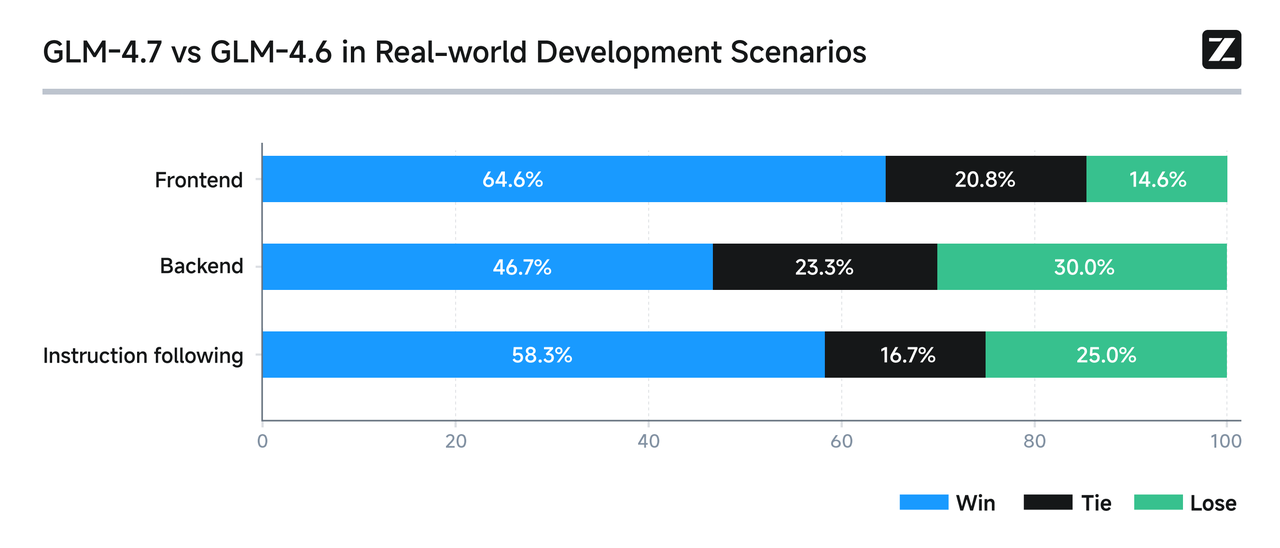 GLM-4.7 vs GLM-4.6 Real-world Development Scenarios - Performance Comparison in Real Development Environment
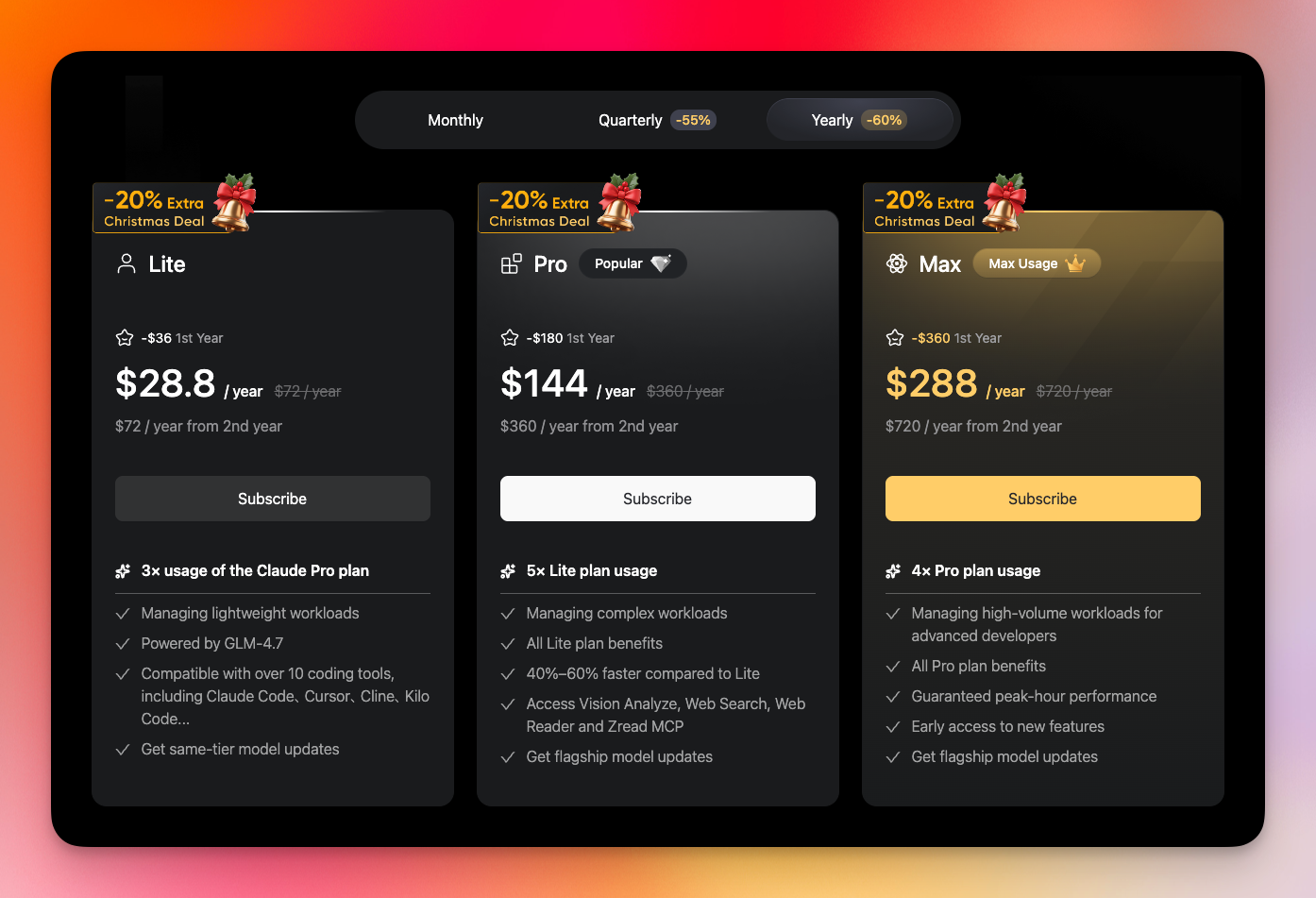 Z.AI Yearly Pricing - Annual Subscription Season Discount Pricing
Using GLM 4.7 with Claude Code - Easy Setup with MoAI-ADK
9.595min
Claude CodeGLM 4.7MoAI-ADKAgentic AIAI AgentsContext Engineering
A practical guide on connecting the GLM 4.7 model with Claude Code and automating configuration with MoAI-ADK's --glm-on command.
Claude Code operates based on Anthropic's Claude models, but there are
situations where leveraging the strengths of other models becomes necessary.
This is particularly evident in large-scale codebase analysis or complex
frontend tasks.
Z.AI's GLM 4.7 offers a 200K token context window and enhanced programming
capabilities. This document covers how to integrate GLM 4.7 with Claude Code and
explains the convenient setup method through MoAI-ADK's automation features.
1. Key Features of GLM 4.7
1.1 Core Technical Specifications
The most notable feature of GLM 4.7 is its 200K token context window. This
resolves the issue of context loss in large-scale projects. It enables analyzing
entire codebases in a single session.
The key strengths of GLM 4.7 are as follows:
Enhanced Programming Capabilities
Benchmark tests show high performance in complex refactoring tasks. It
demonstrates excellent context maintenance during multi-stage requirement
processing, and maintains consistency in code generation.
GLM-4.7 LLM Performance Evaluation - Benchmark ComparisonLarge Code Processing
With 200K token context, most files in typical projects can be processed in a
single session. Support for 128K token output ensures completion without
interruption even during large code generation.
Transparent Reasoning Process
The interleaved reasoning feature exposes the model's thought process. This is
useful for debugging tasks and enables verification of the model's conclusion
derivation process.
Frontend Task Optimization
Shows improved performance in React component and CSS tasks. High quality in UI
layout suggestions, and excellent ability to maintain style consistency.
1.2 Benefits of Claude Code Integration
The combination of Claude Code's agent-based workflow and GLM 4.7 offers the
following advantages:
Single Processing of Complex Tasks
Large refactoring tasks can be handled in a single request without division.
Efficiency improves for simultaneous frontend and backend modification tasks.
Enhanced Debugging Efficiency
Accuracy of error cause analysis increases through full context understanding.
Verification of model judgments becomes easier due to exposed reasoning process.
Improved Development Speed
Time for repetitive tasks is reduced. Automation of test code writing and
documentation tasks is effectively performed.
The chart below shows performance comparison in actual development scenarios
published by Z.AI.
GLM-4.7 vs GLM-4.6 Real-world Development Scenarios - Performance Comparison in Real Development Environment2. Manual Setup Method
2.1 Step-by-Step Setup Procedure
The manual method for connecting GLM 4.7 is as follows:
Step 1: Obtain Z.AI API Key
Create an account on the Z.AI website and obtain an API key.
Step 2: Modify settings.json File
The Claude Code configuration file is located at:
Bash
# Configuration file location~/.claude/settings.json
Modify the configuration file as follows:
JSON
{"env": {"ANTHROPIC_AUTH_TOKEN": "your_zai_api_key","ANTHROPIC_BASE_URL": "https://api.z.ai/api/anthropic","API_TIMEOUT_MS": "3000000"}}
Step 3: Restart Terminal
After saving the configuration, restart the terminal to apply changes.
2.2 Limitations of Manual Setup
The manual setup method has the following issues:
- Path Navigation Complexity: The
~/.claude/folder is set as a hidden directory, making access inconvenient - JSON Syntax Error Risk: Missing punctuation causes Claude Code startup to fail
- Security Configuration Requirements: Separate permission settings for API key files are needed
- Git Commit Risk: API keys may be included in version control if
.gitignoreis not set
Automation tools are needed to resolve these issues. MoAI-ADK, introduced in the
next section, provides the solution.
3. Introduction to MoAI-ADK
Before addressing the complexity of manual setup, let me briefly introduce
MoAI-ADK, the tool used in this document.
3.1 Project Overview
MoAI-ADK (Agentic Development Kit) is an open-source framework that integrates
SPEC-First development methodology, Test-Driven Development (TDD), and AI
agents. "MoAI" means "AI for Everyone," with the goal of realizing a transparent
development lifecycle.
3.2 Core Features
MoAI-ADK provides 5 core features:
SPEC-First Methodology: Specification-based development using EARS (Easy
Approach to Requirements Syntax) format is supported. Explicit requirement
documentation reduces rework by approximately 90%.
TDD Automation: Automated Red-Green-Refactor cycles are applied. Minimum 85%
test coverage is required, and bug occurrence rate is reduced by approximately
70%.
AI Agent Orchestration: Mr. Alfred coordinates over 24 specialized agents
across 5 tiers. Development time is reduced by 60-70% for complex tasks.
Automatic Documentation: Changes are automatically synchronized to project
documentation. 100% documentation currency rate is maintained.
TRUST 5 Quality Framework: Enterprise-grade quality is assured across 5
areas: test coverage, code readability, standard consistency, security checks,
and change tracking.
3.3 Development Workflow
MoAI-ADK operates with a 3-stage cyclic workflow: Plan, Run, Sync.
Loading diagram...
MoAI-ADK Development Workflow - Plan, Run, Sync Cycle Structure
- Plan: The
/moai:1-plan "feature description"command generates specifications including success criteria and test scenarios. - Run: The
/moai:2-run SPEC-001command executes TDD implementation with automatic quality verification. - Sync: The
/moai:3-sync SPEC-001command automates documentation updates and prepares for deployment.
3.4 Installation Method
Installing MoAI-ADK is simple.
System Requirements:
Python 3.11-3.14
uv package manager
Installation Procedure:
Bash
# Install uvcurl -LsSf https://astral.sh/uv/install.sh | sh# Install MoAI-ADKuv tool install moai-adk# Initialize projectmoai-adk init my-projectcd my-project && claude# Configure project> /moai:0-project
MoAI-ADK is now ready. The next section covers the
--glm-on feature that
automates GLM 4.7 connection.4. --glm-on Automation Feature
4.1 Feature Overview
The
--glm-on feature of MoAI-ADK resolves the issues of manual setup discussed
earlier. This feature handles the following tasks with a single command:- Automatic file path navigation
- JSON syntax error prevention
- Security configuration automation
- Automatic
.gitignoreupdates
4.2 Usage Method
Configuration is completed with a single command:
Bash
/moai:0-project --glm-on <your_api_token>
The tasks performed by this command are:
Automatic File Generation: The
.env.glm file is automatically created and
the API token is stored. .claude/settings.local.json configuration is also
handled automatically. No need to manually write JSON structure.Automated Security Configuration:
.env.glm file permissions are set to
0o600, allowing only the owner to read/write. No need for separate chmod
command execution.Prevent Git Mistakes:
.env.glm is automatically added to .gitignore.
Accidental commits of API keys are prevented.Configuration Verification: After command execution, verification of
generated files is performed and results are displayed. Errors can be confirmed
immediately if they occur.
Loading diagram...
GLM 4.7 Setup Sequence - Execution Flow of /moai:0-project --glm-on Command
4.3 Automatic Token Resolution Feature
Token input is only required once initially. Afterwards, it is automatically
searched and used.
Loading diagram...
Token Resolution Flow - API Token Automatic Search Priority
Token Search Order:
- Command Parameter: Token provided in
--glm-on <token>format is used. - Stored File: Token is loaded from existing
.env.glmfile. - Environment Variable: System
ANTHROPIC_AUTH_TOKENenvironment variable is used. - User Input Request: If token cannot be found by above methods, input is requested.
After initial setup, token management is handled automatically.
4.4 Execution Examples
Initial Setup:
Execute the command with your API token:
Bash
/moai:0-project --glm-on sk-xxx-your-api-token-here
Execution result is displayed as follows:
Plain Text
✓ .env.glm file created (permissions: 0o600)✓ .claude/settings.local.json configured✓ .gitignore updated✓ GLM 4.7 setup completed successfully!> Restart Claude Code to apply new settings.
Subsequent Setup:
Token can be omitted:
Bash
/moai:0-project --glm-on
Generated .env.glm File Structure:
Bash
# GLM 4.7 API Configuration# Generated by MoAI-ADK /moai:0-project --glm-on# DO NOT commit this file to version controlANTHROPIC_AUTH_TOKEN=sk-xxx-your-api-token-hereANTHROPIC_BASE_URL=https://api.z.ai/api/anthropicAPI_TIMEOUT_MS=3000000
Comments in the file clearly indicate the purpose of the configuration file.
4.5 Cost Efficiency
GLM integration through MoAI-ADK provides a cost-effective alternative. While
Anthropic Claude Max costs $200 per month, Z.AI's GLM 4.7 offers equivalent
coding performance at a much lower price.
Z.AI Monthly Subscription Plans:
| Plan | Monthly Price | First Month Discount | Key Features |
|---|---|---|---|
| Lite | $6/month | $3 (50% off) | 3x Claude Pro usage, for light tasks |
| Pro | $30/month | $15 (50% off) | 5x Lite usage, 40-60% faster, Vision/Web Search support |
| Max | $60/month | $30 (50% off) | 4x Pro usage, peak hour performance guarantee, early access to new features |
Additional Discount for Annual Subscription (60% off):
| Plan | Annual Price | First Year Discount | Monthly Equivalent |
|---|---|---|---|
| Lite | $72/year | $28.8 (60% off) | $2.4/month |
| Pro | $360/year | $144 (60% off) | $12/month |
| Max | $720/year | $288 (60% off) | $24/month |
Cost Comparison with Claude Code Max:
Z.AI Max annual plan offers very high cost efficiency.
| Service | Monthly Cost | Annual Cost | Notes |
|---|---|---|---|
| Claude Max | $200/month | $2,400/year | Anthropic official |
| Z.AI Max (annual) | $24/month equivalent | $288/year (first year) | 88% savings |
| Z.AI Max (annual, regular) | $60/month equivalent | $720/year | 70% savings |
Based on the first year, Z.AI Max annual plan ($288) is cheaper than Claude Max
monthly fee ($200). You can use the same 200K token context window and advanced
coding features while saving $2,112 annually.
Seasonal Discount Benefits:
Z.AI offers additional discounts during Christmas season and Black Friday
periods. Quarterly subscriptions get -55% discount, annual subscriptions get
-60% discount, and during seasonal promotion periods, an additional 10-20%
discount is applied.
Z.AI Yearly Pricing - Annual Subscription Season Discount PricingReferral Discount Benefits:
Signing up through the link below applies an additional 10% discount.
Referral credits generated from sign-ups through the above link are fully used
for open-source project and R&D sponsorship. It operates in a way that
contributes to the development of the open-source ecosystem, including MoAI-ADK.
Conclusion
This document covered the integration method of GLM 4.7 with Claude Code. The
key points are summarized as follows:
Value of GLM 4.7: With a 200K token context window, single-session analysis
of large-scale projects is possible. It provides enhanced quality for frontend
tasks, and the interleaved reasoning feature enables verification of the model's
thought process.
Limitations of Manual Setup: Risks exist such as JSON syntax errors, missing
security configurations, and Git commit mistakes. This is a cumbersome task even
for experienced developers.
MoAI-ADK's Solution: The
--glm-on feature automates all configuration with
a single command. Security settings and Git management are handled
automatically, and the automatic token resolution feature eliminates repetitive
input.Recommended Next Steps:
- Get API key at Z.AI subscription page (referral link for 10% discount)
- Install MoAI-ADK:
uv tool install moai-adk - Connect GLM 4.7:
/moai:0-project --glm-on <your_api_token> - Restart Claude Code and start development
MoAI-ADK is published under the MIT license, and feedback and improvement
suggestions are accepted through GitHub issues.
References: